Перейти до основного вмісту
Жодних об'єктів не знайдено.
логотип dropboxsign
Переваги Dropbox Sign
Розгорнути або згорнути акордеон

Що ви можете зробити

Підписати документи онлайн
Створення електронних підписів
Виберіть або створіть шаблони
Заповнити і підписати документи PDF
Підготовити онлайн-контракти
Керування документами
Докладніше про функції
піктограма arrow right

Приклади використання

Продажі та розвиток бізнесу
Відділ кадрів
Стартапи
Фінансові технології
Нерухомість
Послуги на вимогу
Продукти
Розгорнути або згорнути акордеон
піктограма dropbox
Sign
Спростіть надсилання та підпис
піктограма dropbox
Sign API
Інтегруйте eSign у свій робочий процес
піктограма dropbox fax
Fax
Надсилайте факси без використання факсимільного апарата
піктограма dropbox integrations
Інтеграції
Ми завжди там, де вам це потрібно
Ресурси
Розгорнути або згорнути акордеон
Блог
Експертиза робочих процесів і новини про продукти
Історії клієнтів
Реальні історії з реальними наслідками
Центр довідки
Поглиблені рекомендації щодо наших продуктів
Бібліотека ресурсів
Звіти, відеозаписи та інформаційні бюлетені
Розробникам
Тарифи
Розгорнути або згорнути акордеон
Тарифи Dropbox Sign
Знайдіть потрібний тарифний план
Тарифи API Dropbox Sign
Реальні історії з реальними наслідками
Звернутися до відділу продажів
Зареєструватися
Звернутися до відділу
продажів
Увійти
Розгорнути або згорнути акордеон
Dropbox Sign
Dropbox Forms
Dropbox Fax
Безкоштовна пробна підписка
Блог
/
Консультації з питань управління кадровими ресурсами

How to create and use Dropbox Sign Templates to make hiring faster

by 
Cory Shrecengost
March 17, 2023
4
хв. на читання
An illustration of a computer zooming through space
підказка до піктограми

Новий інтерфейс, той же найкращий продукт! HelloSign тепер має назву Dropbox Sign.

піктограма «закрити»

58% of businesses primarily focus on paperwork during the onboarding process. While we all know paperwork is important, it shouldn’t take away from time that could be spent improving the new hire experience and reducing time to hire.


Dropbox Sign can specifically save you time on formatting and data entry so that you can get your documents prepared and signed faster—and it’s helping businesses save huge amounts of time.

  • Flow reduced the administrative time for hiring healthcare professionals by 50% using templates.
  • Crelate’s applicant tracking system uses Dropbox Sign to help recruiters build templates with multiple eSignature fields in under one minute.
  • And happy HR users are saying things like, “I set up some templates with Dropbox Sign and found them to be simple and extremely easy to remove redundancy. Great work!”

Looking for time-saving results like these? Follow our step-by-step guide on how to create templates in Dropbox Sign.

‍

Free NDA template
Download our free NDA template and add to your Dropbox Sign account as a Template
Download non-disclosure agreement free template
Піктограма стрілки

‍

Setting up the template


1. If you’re starting from the Dropbox Sign app home, click Create a template.

‍

2. Upload your document(s) by choosing Upload file or using cloud storage options, such as Dropbox, Google Drive, Evernote, or OneDrive. You can also drag-and-drop from your computer.

a screenshot of the document upload screen. It says "what needs to be signed?"
Upload options on Templates page


3. Once you've uploaded your documents, select Next.

‍

4. Add in the signer roles. For example, if you’re creating a social media policy template, you could enter “Company Representative” and “Internal Representative” for your Role titles.
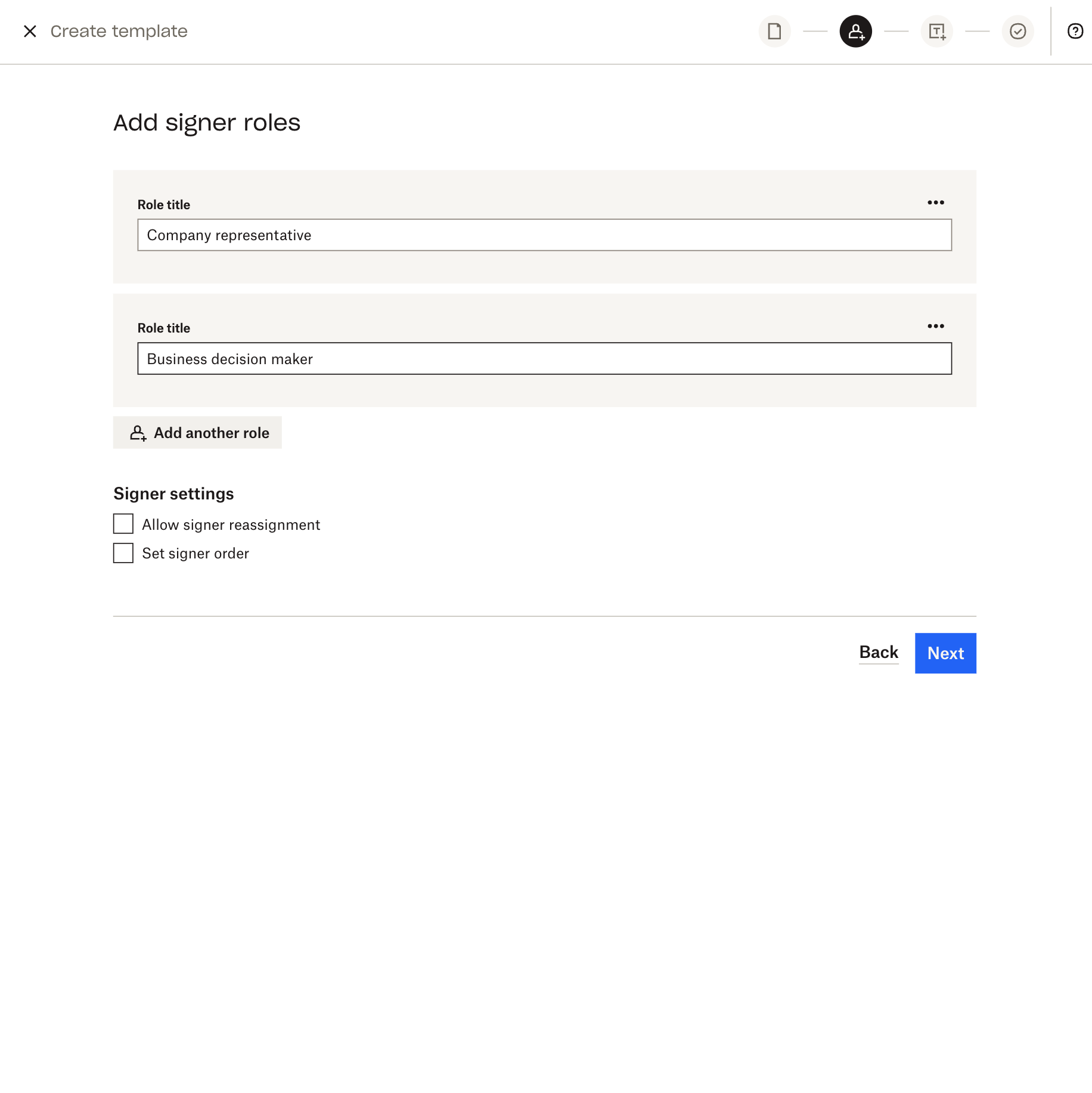
Screenshot of the Dropbox Sign UI that says "who needs to sign" and shows signer roles fields
Signer roles fields

‍

4. You can also set the signer order here by toggling the Set signer order switch under Signer settings. Setting your signer order lets you determine who will sign the document first, second, third, and so on.

  • If you don’t enable a signer order, all of your signers will receive the signature request when it hits their inbox, so they won’t have to wait for anyone else to sign the document.

‍

5. Click Next.

‍

Editing your template

1. Once you’re in the editor—the place where you add fields like name and signature to your uploaded document—you can pre-populate information on your template by choosing an option from the drop-down menu under Signers.

  • Note that if you use the Me (now) option, the same information will be pre-populated on all requests using that specific template. But if instead you’d like to pre-populate information that will change every time, select Sender.
Screenshot of a social media policy template uploaded to Dropbox Sign.
Document editing screen with signer dropdown

‍

2. Start placing your fields by dragging and dropping them from the left-hand side.

  • For example, if you want to generate your company’s name, you can drag-and-drop a text field onto the template, then on the right side of the editor, type in “Company Name” under Merge field.
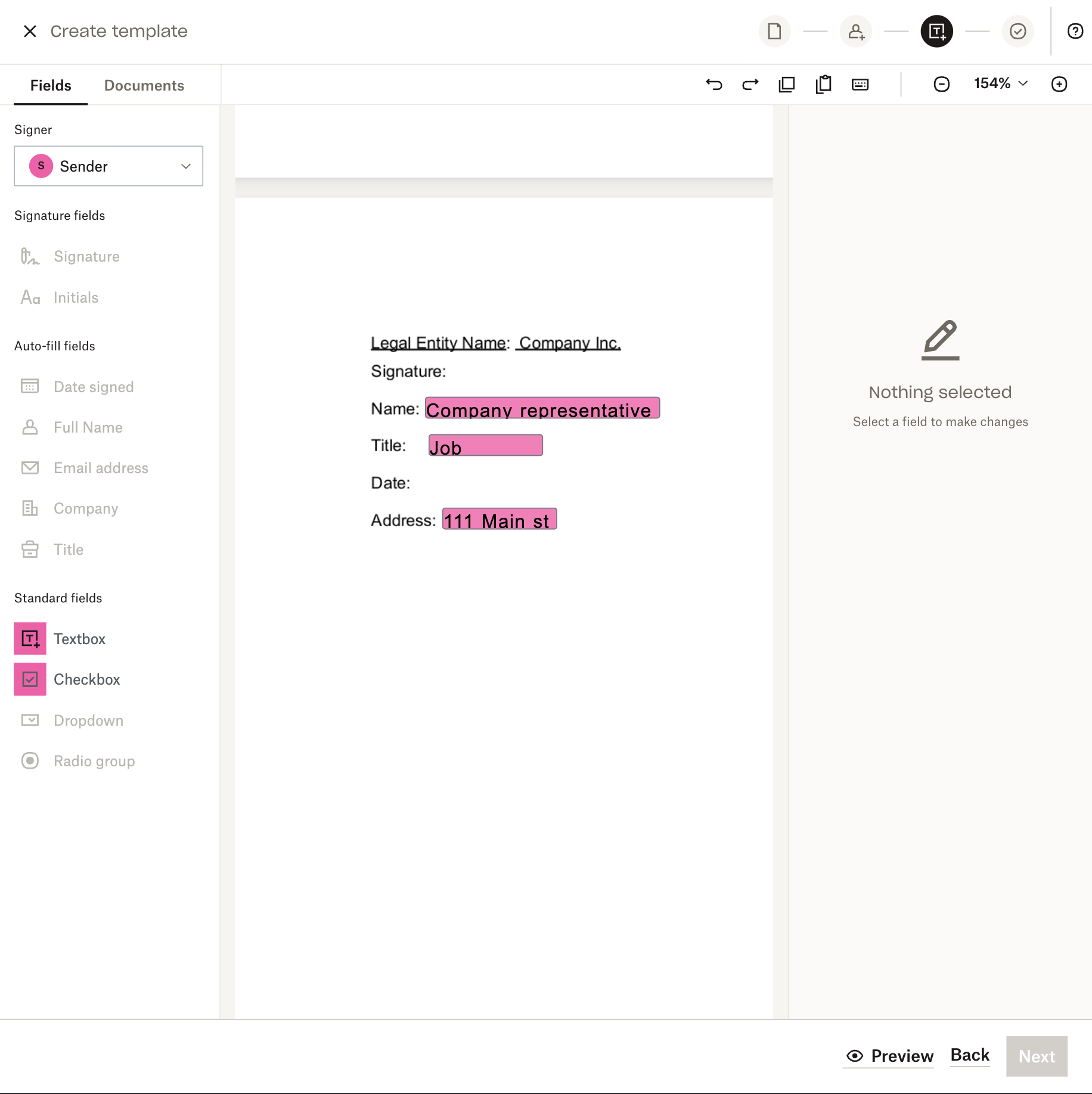
The screenshot shows a "textbox" field being added to the social media policy
Adding signer fields to sender

‍

3. Add at least one field assigned to each role that you’ve created for this template, including any signature. When you send this particular template, they’ll be prompted to fill out this information before returning.
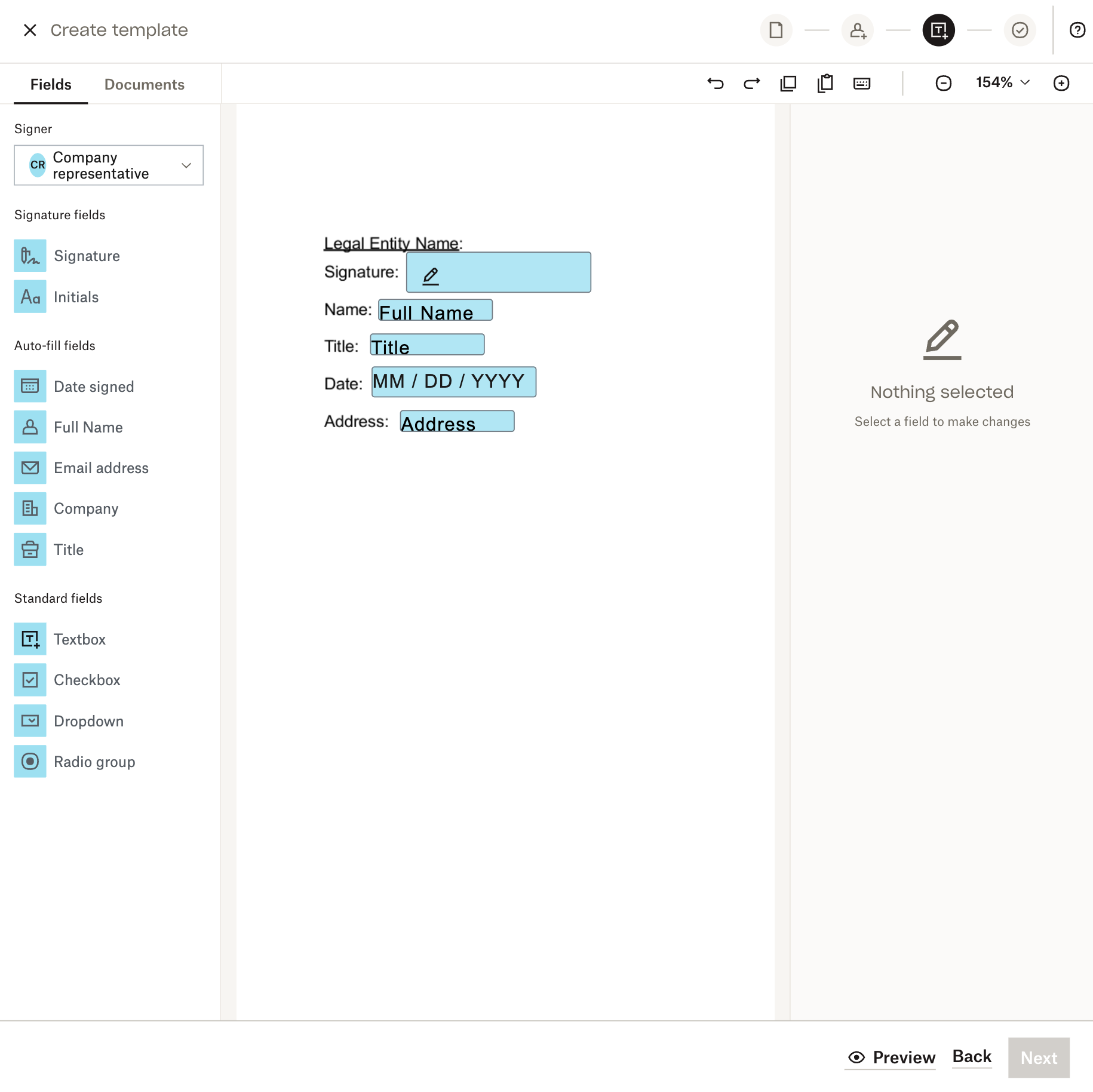
The screenshot shows adding a signature line to the document
Adding fields to Template for signer

‍

4. Once you've placed all of your fields down, select Next.

‍

Saving your template

1. Review your information, including your signer roles, to make sure everything looks good.

‍

2. Add a title for your template. You can add CC recipients and an additional message here, too. Note that both the template title and additional message can be updated by individual people who use the template to send signature requests.
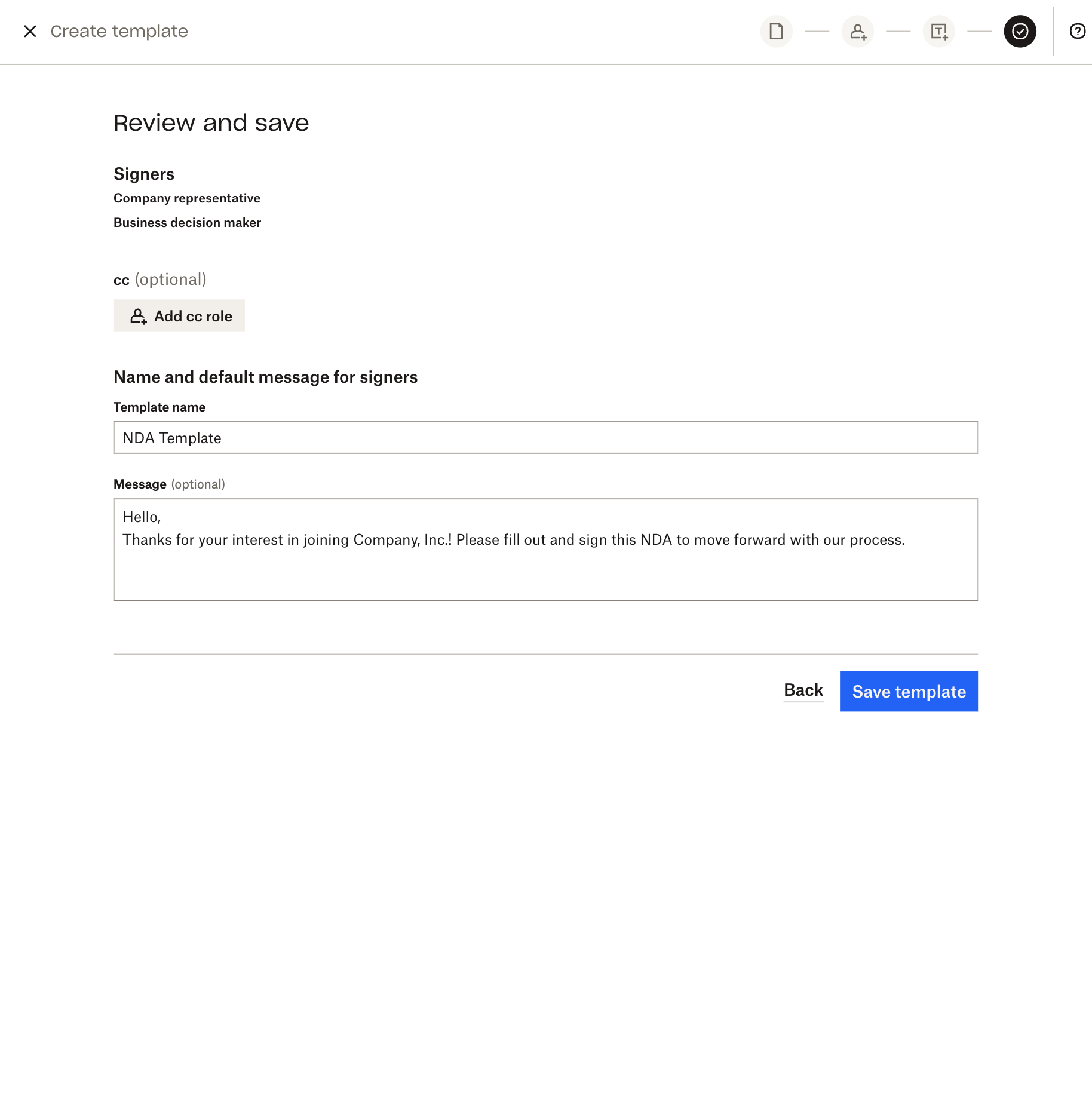
The screenshot shows a page that asks you to add a title and default message for signers and a template title.
Template name and message page

‍

3. Click Save Template, and you’re done!

‍

Prepare, send, and sign documents in record time with Dropbox Sign Templates

You’ve heard about the impact that templates can have on improving your slow hiring process and you’ve seen how easy they are to implement with Dropbox Sign. So why not start saving time and try Templates for yourself?


There's way more to learn about hiring
Find everything you need to make smart hiring decisions and build a strong team that will help your small business thrive from eBooks to templates.
Download the ultimate hiring packet
Піктограма стрілки

Будьте в курсі справ

Готово! Перевірте поштову скриньку.

Thank you!
Thank you for subscribing!

Lorem ipsum

Lorem ipsum dolor sit amet, consectetur adipiscing elit. Suspendisse varius enim in eros elementum tristique. Duis cursus, mi quis viverra ornare, eros dolor interdum nulla, ut commodo diam libero vitae erat. Aenean faucibus nibh et justo cursus id rutrum lorem imperdiet. Nunc ut sem vitae risus tristique posuere.

Lorem ipsum
піктограма arrow right
піктограма «закрити»

Up next:

illustration of a man with a ladder standing on a bunch of shapes slowly assembling them in a document
Консультації з питань управління кадровими ресурсами
4
хв. на читання

Is it time to update your employment contracts?

A man is opening a handbook up and a bright shining light is showing on his face
Консультації з питань управління кадровими ресурсами
7
хв. на читання

How to get started with an employee handbook

Електронна книга

Розвиток ефективної культури віддалених продажів у світі після пандемії

Продукти
Dropbox SignDropbox Sign APIDropbox FaxІнтеграції
Переваги Dropbox Sign
Електронні підписиПідписати документиПідписування та заповнення документа PDFОнлайн-угодиСтворення електронних підписівРедактор підписівПідписати документи Word
Служба підтримки
Центр довідкиЗвернутися до відділу продажівЗвернутися до служби підтримкиКерування файлами cookieПочаток роботи: Dropbox SignПочаток роботи: API Dropbox Sign
Ресурси
БлогІсторії клієнтівРесурсний центрПосібник із питань дотримання вимог законодавстваЦентр управління безпекою
Партнери
Стратегічні партнериПошук партнерів
Компанія
ВакансіїУмовиКонфіденційність
піктограма facebookпіктограма youtube

Прийняті способи оплати

логотип Mastercardлоготип Visaлоготип American Expressлоготип Discover
Бейдж Відповідності CPAбейдж Відповідність HIPAAбейдж Sky High Enterprise Readyбейдж Сертифіковано ISO 9001

Електронні підписи Dropbox Sign є юридично зобов'язувальними на території США, Європейського Союзу, Великої Британії та багатьох інших країн світу.
Для отримання додаткової інформації перегляньте наші Умови та Політику конфіденційності