Pasar al contenido principal
No se encontró ningún elemento.
logo de dropboxsign
¿Por qué Dropbox Sign?
Expandir o contraer acordeón

Lo que puedes hacer

Firmar documentos onlines
Crear firmas electrónicas
Selecciona o crea plantillas
Rellena y firma PDF
Completa contratos online
Administración de documentos
Explora las características
ícono de flecha que apunta hacia la derecha

Casos de uso

Ventas y desarrollo de negocios
Recursos Humanos
Empresas emergentes
Tecnología financiera
Inmobiliario
Servicios a la carta
Productos
Expandir o contraer acordeón
ícono de dropbox
Sign
Facilita el envío y la firma
ícono de dropbox
Sign API
Integra eSign en tus flujos de trabajo
ícono de dropbox fax
Fax
Envía faxes sin usar una máquina de fax
ícono de integraciones de dropbox
Integraciones
Nos reunimos contigo donde trabajas.
Recursos
Expandir o contraer acordeón
Blog
Novedades sobre productos y experiencia en flujos de trabajo
Historias de clientes
Historias del mundo real con resultados reales
Centro de ayuda
Orientación en profundidad para nuestros productos
Biblioteca de recursos
Informes, videos y hojas informativas
Desarrolladores
Precios
Expandir o contraer acordeón
Precios de Dropbox Sign
Buscar el plan apropiado para ti
Precios de la API de Dropbox Sign
Historias del mundo real con resultados reales
Comunícate con ventas
Registrarse
Comunícate con ventas
Inicia sesión
Expandir o contraer acordeón
Dropbox Sign
Dropbox Forms
Dropbox Fax
Pruébalo gratis
Blog
/
Aspectos básicos de las firmas electrónicas

Dropbox Sign's Signature Maker

by 
Jenna Schlosbon
October 23, 2013
2
minuto de lectura
Dropbox Sign's Signature Maker
icono tooltip

Nuevo aspecto, ¡el mismo gran producto! HelloSign ahora es Dropbox Sign.

icono cerrar


Dropbox Sign’s signature maker creates a totally new electronic signature experience. People assume that “

‍

Not so! 

‍

Dropbox Sign lets you create signatures in four different ways. 

‍

Do you feel more comfortable with your hand-drawn signature on your documents? That’s no problem. You can take a photo of your actual signature on a piece of paper and upload it to Dropbox Sign’s signature maker using a smartphone or regular camera. 

‍

Some people prefer to draw their signature on a document each time rather than using the same exact image over and over again. For this kind of authenticity, you can use our signature maker to draw your signature using your mouse. 

‍

You can also always choose to type your eSignature. We have a variety of fonts in our signature maker as well, so you can find one that looks natural and that you feel best represents you. 

‍

And if you’re sending a document out for a client or applicant to sign and you want to limit the signing options - you can! Just go to "Settings" to select the signature type or types that you are willing to accept.

‍

Here's how to create each of the four signature types in Dropbox Sign's signature maker:

‍

1. Take a photo of your signature with your smartphone

‍


Snap a photograph of your signature using the camera on your smartphone. For best results, be sure the signature is on white, unlined paper. Then, email the image on your phone to
and use the unique subject code provided for you in the signature maker. When you click “Next,” your signature will pop up in a few seconds.


‍

‍

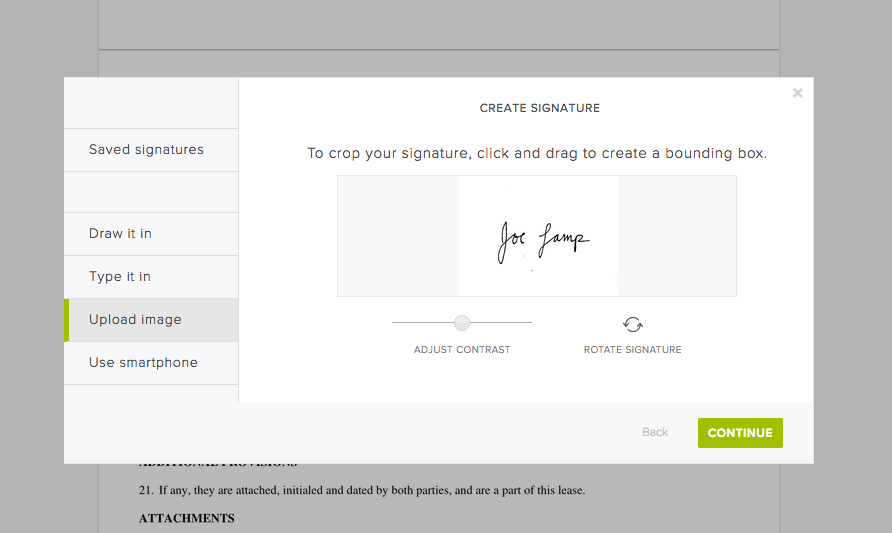
2. Upload an image from your computer

‍

If you have a signed and scanned document on your computer, you can take a quick screenshot of your signature, then upload the image file. As with the smartphone option, you can rotate, crop, and contrast the signature as you see fit and save it for later use.
‍

‍

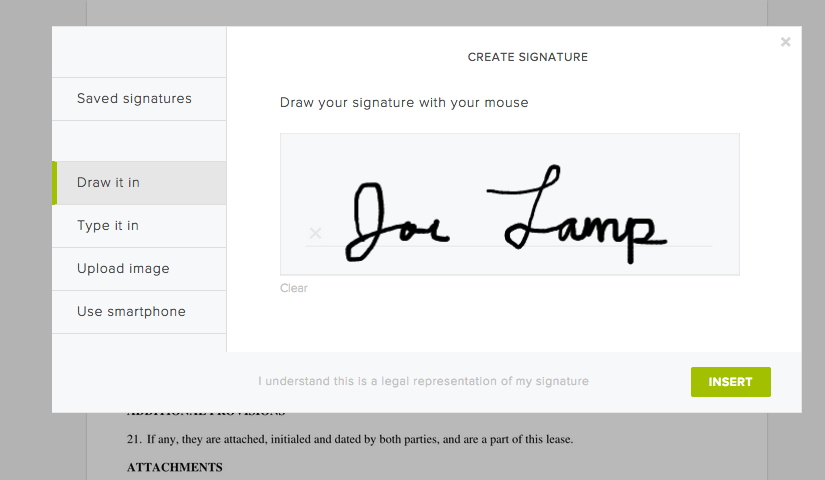
3. Draw your signature with your mouse

‍

Use your mouse or touch pad to draw in your signature. You can save the mouse-drawn version to use it again and again, or re-draw from scratch each time. It’s up to you.
‍

‍

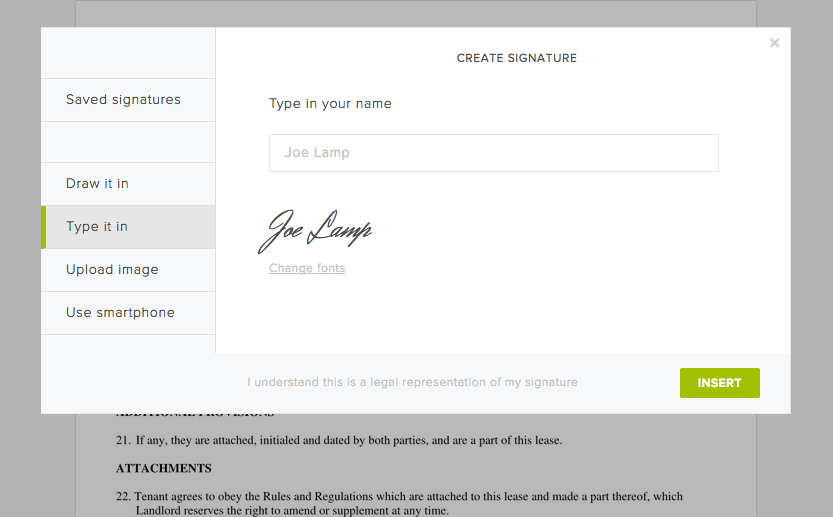
4. Type your signature

‍

Of course, you can always simply type your name and then select a font you like. Just click "Change fonts" to sample the various styles we have available, then click "Add signature" to place it on your document.
‍

‍

And that's it! 

‍

Pretty easy right? Now go and enjoy the extra time you get back from not printing and faxing your documents!

Mantente actualizado

¡Listo! Consulta tu bandeja de entrada.

Thank you!
Thank you for subscribing!

Lorem ipsum

Lorem ipsum dolor sit amet, consectetur adipiscing elit. Suspendisse varius enim in eros elementum tristique. Duis cursus, mi quis viverra ornare, eros dolor interdum nulla, ut commodo diam libero vitae erat. Aenean faucibus nibh et justo cursus id rutrum lorem imperdiet. Nunc ut sem vitae risus tristique posuere.

Lorem ipsum
ícono de flecha que apunta hacia la derecha
icono cerrar

Up next:

Una persona está trabajando con una computadora portátil en un escritorio. La pantalla muestra cómo se agrega una firma electrónica a un documento.
Aspectos básicos de las firmas electrónicas
8
minuto de lectura

SES, AES y QES: explicación de los tipos de firmas electrónicas

Person signing a document on a tablet in a living room.
Aspectos básicos de las firmas electrónicas
5
minuto de lectura

How to validate a digital signature—and why it matters

Hoja de información

Cómo las firmas electrónicas ayudan a las PYMES a vender más rápido, contratar desde cualquier lugar y aumentar la productividad de los empleados

Productos
Dropbox SignAPI de Dropbox SignDropbox FaxIntegraciones
¿Por qué Dropbox Sign?
Firmas electrónicasFirmar documentosFirma y rellena PDFContratos en líneaCrear firmas electrónicasEditor de firmasFirma documentos de Word
Soporte
Centro de ayudaComunícate con ventasComunícate con soporteAdministrar cookiesPrimeros pasos: Dropbox SignPrimeros pasos: API de Dropbox Sign
Recursos
BlogHistorias de clientesCentro de RecursosGuía de legalidadCentro de confianza
Socios
Socios EstratégicosLocalizador de socios
Empresa
Carrera profesionalCondiciones del servicioPrivacidad
ícono de facebookícono de youtube

Formas de pago aceptadas

logo de Mastercardlogo de Visalogo de American Expresslogo de Discover
Insignia de cumplimiento con la CPAInsignia de cumplimiento con la HIPAAInsignia Sky High Enterprise ReadyInsignia de certificación ISO 9001

Las firmas electrónicas de Dropbox Sign son legalmente vinculantes en los Estados Unidos, la Unión Europea, el Reino Unido y en muchos países del mundo.
Para obtener más información, consulta nuestros Términos y Condiciones y Política de Privacidad
