


Nyt udseende – samme fantastiske produkt! HelloSign hedder nu Dropbox Sign.

Microsoft’s .NET Core framework is popular with developers creating data management systems for organizations of all sizes. The MVC architecture and Entity Framework are well-adapted to maintaining scalable databases with robust built-in User profiles and authentication.
Many such organizations also need to manage large volumes of documents, as well. Dropbox Sign is an excellent option for C#/.NET developers looking to integrate eSignatures into their applications to meet those needs.
In this guide, we’ll show how Dropbox Sign’s embedded SignatureRequests and white-labeling options could be used to manage contracts and waivers for an athletic league. Let’s call it Company Inc.—and let’s see how to integrate Dropbox Sign into a new .NET project.
To learn more about the Dropbox Sign API, visit the Dropbox Sign Developer Portal and start testing for free (no credit card required).
Set Up Dropbox Sign In Your .NET Core Project
We created a database management application for Company Inc. with `dotnet new mvc`, using Pomelo to handle the MySQL connection.
Once you have created your .NET project folder, install the Dropbox Sign NuGet package by entering `dotnet add package hellosign` in your CLI.
Before you begin integrating Dropbox Sign into your application, you’ll need to create a Dropbox Sign account. After creating your account, go to “My Settings” and navigate to the API tab on your dashboard. There, you’ll find your API key. You will also need to create a Dropbox Sign API App. To do that click on “Create” in the API Apps section. Give your API App a name and a domain. As long as you are in the testing phases of development, you can ignore the domain verification fields, as those are only required for production applications. Once you add your App, you will get a Client ID specific to this project.
Save both your API key and Client ID in your project:
Keys.cs
Be sure to add the file to your .gitignore file to keep these secrets out of source control.
Create Entity Relationships for SignatureRequests
Anytime you create a .NET project with the Entity Framework, you need to think through how you’ll map objects in your code to your database. Even though Dropbox Sign handles our signature requests, we’ll need to store some details on our side so we can track progress. Entity Relationships will help here, but first we need to look at what to expect from Dropbox Sign.
Dropbox Sign provides developers two primary options to use the API:
- Have Dropbox Sign generate emails to Signers with your documents linked
- Embed SignatureRequests directly in your application
The second option, which we’ll show in this tutorial, keeps the entire signing and review process on your website and displays SignatureRequests in an <iFrame> HTML element. This creates a seamless experience for your users and allows developers to write functions for administrators to assign and monitor SignatureRequests from inside the user database.
For Company Inc., we are managing data with Entity Framework. Using Dropbox Sign’s embedded SignatureRequests means we only need to store a single data point for each SignatureRequest in our Model. The SignatureRequestID will give us quick access to the SignatureRequest object as required. The Entity Relationship Diagram below shows how SignatureRequests are tracked in the database.
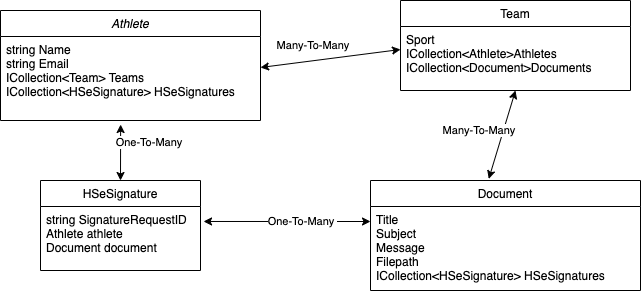
The signed Documents needed for a particular Athlete are determined by what Teams they are a part of. Each SignatureRequest is associated with a single Athlete and single Document.
Create Methods for Your Dropbox Sign Model to Send, Sign, and Track SignatureRequests
The Dropbox Sign API includes endpoints for a wide range of functions. At the most basic, your application will send a SignatureRequest, obtain a unique URL to each signer to be embedded, and retrieve the SignatureRequest to check the status and review signatures.
We chose to keep all of the API calls together as properties of the `HSeSignature` model, and dispatch them all from a single controller. The `CreateEmbeddedSignatureRequest` method takes a specific Athlete and Document as parameters, and uses properties of these particular Entities to create the SignatureRequest object. These can be passed in through the Controller via the ViewBag or as the Application User if you are using Identity.
Models/HSeSignature.cs
Controllers/HSeSignaturesController.cs
Integrate Dropbox Sign’s Embedded SDK as a Script
The embedded signing experience for the User happens entirely on your site, so you can create Views around the workflow that is best for your users. The Dropbox Sign Embedded package is available as a Node package, but because working with npm in .NET can be difficult, we’ve chosen to import the package through the CDN. Either way, developers have access to a range of different functions within the Embedded flow.
By default, the CDN will attach itself to the Window object since it creates an <iFrame> element. Since JavaScript can’t access the Client ID from the .NET namespace, you will also need to save your Client ID in a .env file.
hellosign.js
Once you’ve created the embedded client script, you should embed it as a <script> inside the <head> of your html. For Company Inc., we created an `_HSLayout.cshtml` file separate from the shared `_Layout.cshtml` View, so that the HelloSign script is only included in the <head> in Views where it will actually be used. Otherwise, the two layout files are the same.
Views/Shared/_HSLayout.cshtml
Any View using this layout will be able to call the methods in `hellosign.js`. For example, the `SignDocument` View created above by the `HSeSignaturesController` uses this layout and script:
Views/HSeSignatures/SignDocument.cshtml
Clicking the button will open an <iFrame> element with the Document passed in through the Controller, allowing the Athlete to sign forms while still on the Company Inc. website.
Use White Labeling to Create an On-Brand User Experience
Once you have created an Embedded SignatureRequest flow in your application, you can further customize it with Dropbox Sign’s white labeling options. You can customize the colors of text, background, buttons, and hover effects to match your website’s color scheme, giving users a more cohesive signing experience.
Once white labeling options have been set for your API App, they will remain in place unless you change them. For most applications, it makes sense to do this with a Curl request to update your app once other functionality is fully in place.
For Company Inc. and other organizations managing many users with many eSignature needs, Dropbox Sign Embedded Signing is a great fit. It offers a straightforward, reliable way to integrate SignatureRequests with your other data and gives your users the smooth, consistent experience they expect—while ensuring you get the signatures needed to satisfy your legal team.
To learn more about the Dropbox Sign API and start testing for free, visit Dropbox Sign’s Developer Portal.
Hold dig opdateret
Thank you!
Thank you for subscribing!


