


新しい名前でも変わらぬ高品質!HelloSign の名称が Dropbox Sign になりました。

Every new employee onboarding requires signing and submitting several official documents. While physical paperwork served well in the past, nowadays many companies do not even have a physical office at all. Getting documents signed and submitted through the mail can be a major headache. So what’s the best solution in the age of remote work?
eSignature documents alleviate the headache of signing physical documents by digitizing the entire process. Having a seamless onboarding experience is an opportunity to improve employee satisfaction and keep their level of excitement high. Dropbox Sign can help take employee onboarding documents out of the corner file cabinet and transform them into feature-rich virtual documents, singable anywhere.
The Dropbox Sign eSignature API makes building eSignature workflows and organizing digital documents more manageable than ever before. Employees can be assigned documents, such as NDAs and W-9s, and have them accessible in one centralized place.
Autofill Employee Information
Dropbox Sign can autofill your employee's information for them, saving time and effort while ensuring accuracy. You didn't hire them to spend an hour or two filling out the same personal details over and over again on dozens of documents, after all. Let's go through a basic example of the Dropbox Sign API in action.
We have two main users: HR reps and employees being onboarded. We’ll use the Dropbox Sign API to allow HR reps to create eSignature templates and employees to sign onboarding docs on the same web portal.
Dropbox Sign offers SDKs in a number of languages; we'll be using the NodeJS SDK. The functionality detailed below can be utilized in any SDK, or with calls directly to the API. Also, our documentation shows example calls for endpoints in all of the supported languages. Be sure to give it a look as you build out your apps!
If you don't already have a Dropbox Sign account, create one, and then grab your API key from the settings page. While you're at it, make a Dropbox Sign API app, and jot down the Client ID for that app. The API key and Client ID are all the information you need to begin.
First, consider where you're getting the information that will auto-populate the fields you set up. You might be using a database or calling another API. As long as you have some way to pull that data into your application, the SDK can be use it to auto-fill documents.
Use the Create Embedded Template Draft endpoint to draft up a template for your Human Resources team to edit. From here you can declare the title, subject, and other parameters. You can also set up `merge_fields`, which allow you to prefill data with information you already have about the employee.
In this example, we’re creating a template with two `merge_fields`: “New Hire Name”, and “New Hire Address”. Both are inserted into textbox fields in the document that are prefilled with employee data during signing.
The `edit_url` gets passed to the front end and embedded in an iFrame on your web portal, where HR reps can finish setting up the template, as show in the picture below. By placing the autofill field called "Full Name" on the document, the employee won't have to manually type in their full name. Instead, the autofill field will populate their name when they fill out the template for themselves.
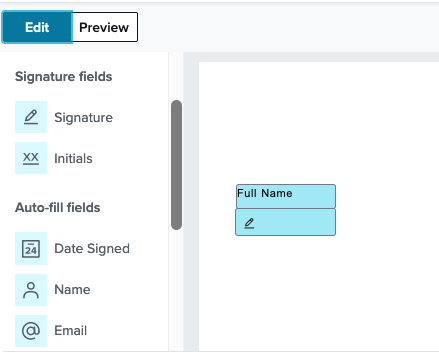
Once the template is edited by HR, it is saved to Dropbox Sign. Now future signing flows can reference the “NDA template” by using the `template_id` when creating their signature requests. Next, we’ll use the new template for embedded signing to allow new hires to sign directly on the portal.
Embed eSignature signing in company portal
Now we'll be using the API to allow employees to sign signature requests from the employee portal. Specifically, we'll set up an API request for a new employee named Jack as the signer so he can quickly sign his onboarding documents.
Be sure to pass a `custom_fields` parameter when your app creates signature requests using merge fields. The custom fields passed in the signature request must match the merge fields used to create the template. This is where your app will pull in the employee information.
The key of your Custom Field needs to match the Merge Field in the template so the corresponding value will be pre-filled on the document when it’s signed.
If the request is successful, great! Grab a piece of information before moving on: the `sign_url`. You can grab it via Jack's `signature_id` with the Get Embedded Sign URL.
This `sign_url` is passed on to the front end of the employee portal, where Jack can then sign the document wherever it is embedded.
Your control doesn't stop behind the scenes because you can also customize how the signing experience will appear to your new hires. Just like how they'll dress to impress on their first day, you can dress up your company's signing experience.
Customize Your Scalable Signing Experience
Using Dropbox Sign, your users will see a customizable page with an embedded iFrame that will walk them through the signing process. The frontend methodology is the same for creating both standard and templated eSignature requests.
To embed and customize, you'll need to install Dropbox Sign Embedded with npm
That's all you need to install before delving into the code. In this example, we'll be showing you how to implement the eSignature iFrame into a basic HTML webpage using plain JavaScript. You just need to place the code snippet in the `<script>` tag on your page.
You also need to grab the from your backend. With these parameters, you're ready to display the iFrame on the web portal. You'll want to pass `edit_url` to a page accessible by employees working in Human Resources so they can edit the template, and pass `sign_url` to the page that new employees can access so they can sign the document.
You can customize the behavior of the iFrame via the open() method. For example, you can adjust the language used in the request or add a redirect URL for the page after the signing process is complete. A quick way to test out these features is with Dropbox Sign's Embedded Testing Tool.
For aesthetic design, you'll want to turn to our Premium Branding feature. Premium branding allows you to add your company's specific logos, colors, and branding to the embedded Dropbox Sign page.
There are a variety of aesthetic customizations possible which are detailed in the Premium Branding Guide. For premium branding, you'll use the Update API App endpoint, as premium branding is adjusted at the app level. For example, to update the company logo and change the color scheme of the primary button, you would do the following:
Once you've customized the experience to your liking, you'll have the perfect design for any future new employees. That's what is so useful about implementing an eSignature flow in this manner; a lot of the busy work is gone for good. In fact, you could design your app to listen for instances of new employees being added to the employee resource you're pulling from, perhaps via a webhook, and automatically send out the signature requests without a single human action needed.
Improve employee satisfaction with seamless onboarding
There are a lot of difficulties businesses experience when growing, but dealing with ever-increasing piles of paperwork doesn't need to be one of them. Implement the eSignature flow with Dropbox Sign to ensure that your onboarding process is automated and scalable. For more information on what else you can do with the Dropbox Sign API, be sure to check out our developer portal.
効率を維持
Thank you!
Thank you for subscribing!


