Direkt zum Hauptinhalt
Keine Inhalte gefunden.
Logo von Dropbox Sign
Warum Dropbox Sign?
Akkordeon auf- oder zuklappen

Das können Sie tun

Dokumente online unterzeichnen
Elektronische Signaturen erstellen
Vorlagen auswählen oder erstellen
PDFs unterzeichnen und ausfüllen
Online-Verträge ausfüllen
Dokumentenverwaltung
Features erkunden
Symbolpfeil rechts

Anwendungsfälle

Vertrieb und Geschäftsentwicklung
Personalwesen
Start-ups
Finanztechnologie
Immobilien
On-Demand-Services
Produkte
Akkordeon auf- oder zuklappen
Symbol Dropbox
Sign
Einfaches Versenden und Unterschreiben
Symbol Dropbox
Sign API
Integrieren Sie eSign in Ihren Arbeitsablauf
Dropbox Fax-Symbol
Fax
Faxversand ganz ohne Faxgerät
Dropbox-Integrationen-Symbol
Integrationen
Wir passen uns an Ihre Arbeit an
Ressourcen
Akkordeon auf- oder zuklappen
Blog
Workflow-Fachwissen und Produktneuheiten
Erfolgsgeschichten von Kunden
Geschichten aus der realen Welt mit realen Ergebnissen
Hilfecenter
Ausführliche Anleitung für unsere Produkte
Ressourcenbibliothek
Berichte, Videos und Infoblätter
Entwickler
Preise
Akkordeon auf- oder zuklappen
Dropbox Sign – Preisgestaltung
Das individuell passende Abo finden
Dropbox Sign API – Preisgestaltung
Geschichten aus der realen Welt mit realen Ergebnissen
Vertrieb kontaktieren
Registrieren
Vertrieb kontaktieren
Anmelden
Akkordeon auf- oder zuklappen
Dropbox Sign
Dropbox Forms
Dropbox Fax
Kostenloses Probeabo
Blog
/
Grundlagen zu elektronischen Signaturen

Dropbox Sign's Signature Maker

von 
Jenna Schlosbon
October 23, 2013
2
Minuten Lesedauer
Dropbox Sign's Signature Maker
Symbol für Tooltip

Neues Aussehen, gleiches tolles Produkt! HelloSign heißt jetzt Dropbox Sign.

Schließ-Symbol


Dropbox Sign’s signature maker creates a totally new electronic signature experience. People assume that “

‍

Not so! 

‍

Dropbox Sign lets you create signatures in four different ways. 

‍

Do you feel more comfortable with your hand-drawn signature on your documents? That’s no problem. You can take a photo of your actual signature on a piece of paper and upload it to Dropbox Sign’s signature maker using a smartphone or regular camera. 

‍

Some people prefer to draw their signature on a document each time rather than using the same exact image over and over again. For this kind of authenticity, you can use our signature maker to draw your signature using your mouse. 

‍

You can also always choose to type your eSignature. We have a variety of fonts in our signature maker as well, so you can find one that looks natural and that you feel best represents you. 

‍

And if you’re sending a document out for a client or applicant to sign and you want to limit the signing options - you can! Just go to "Settings" to select the signature type or types that you are willing to accept.

‍

Here's how to create each of the four signature types in Dropbox Sign's signature maker:

‍

1. Take a photo of your signature with your smartphone

‍


Snap a photograph of your signature using the camera on your smartphone. For best results, be sure the signature is on white, unlined paper. Then, email the image on your phone to
and use the unique subject code provided for you in the signature maker. When you click “Next,” your signature will pop up in a few seconds.


‍

‍

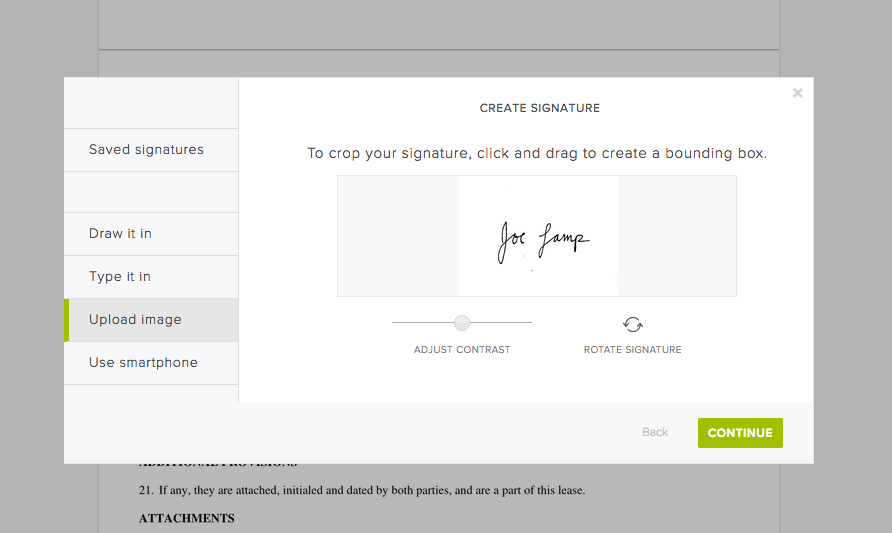
2. Upload an image from your computer

‍

If you have a signed and scanned document on your computer, you can take a quick screenshot of your signature, then upload the image file. As with the smartphone option, you can rotate, crop, and contrast the signature as you see fit and save it for later use.
‍

‍

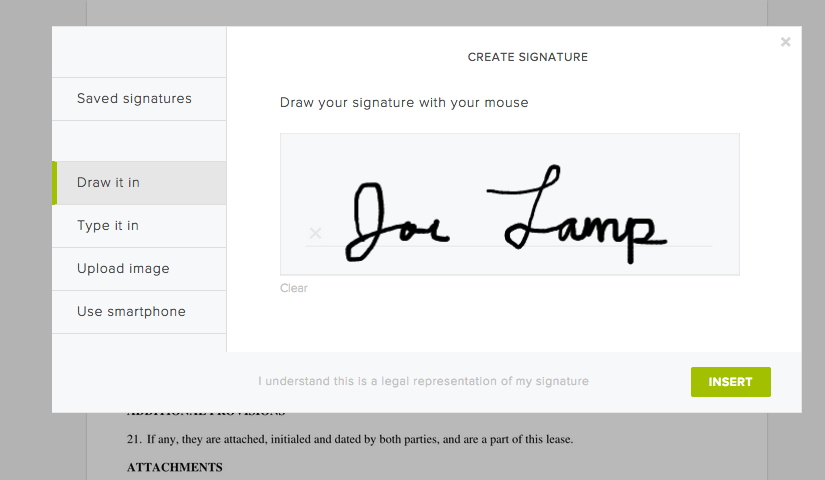
3. Draw your signature with your mouse

‍

Use your mouse or touch pad to draw in your signature. You can save the mouse-drawn version to use it again and again, or re-draw from scratch each time. It’s up to you.
‍

‍

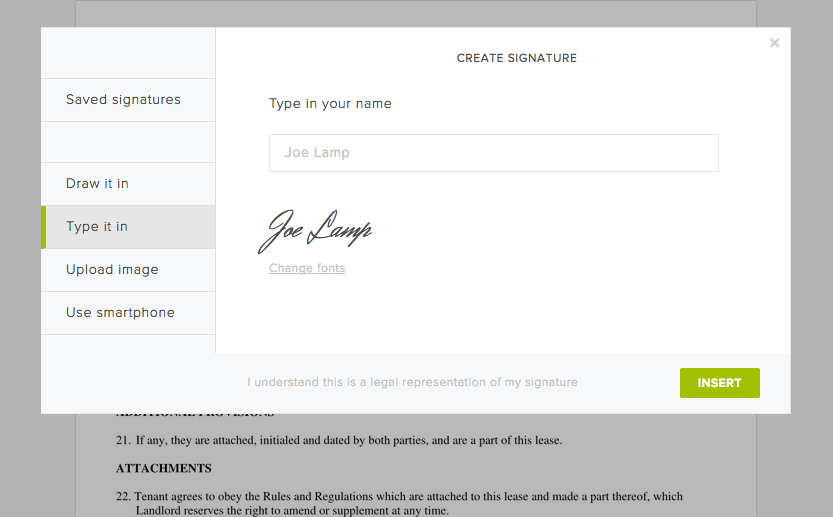
4. Type your signature

‍

Of course, you can always simply type your name and then select a font you like. Just click "Change fonts" to sample the various styles we have available, then click "Add signature" to place it on your document.
‍

‍

And that's it! 

‍

Pretty easy right? Now go and enjoy the extra time you get back from not printing and faxing your documents!

Immer auf dem neuesten Stand

Fertig! Sehen Sie bitte in Ihrem Posteingang nach.

Thank you!
Thank you for subscribing!

Lorem ipsum

Lorem ipsum dolor sit amet, consectetur adipiscing elit. Suspendisse varius enim in eros elementum tristique. Duis cursus, mi quis viverra ornare, eros dolor interdum nulla, ut commodo diam libero vitae erat. Aenean faucibus nibh et justo cursus id rutrum lorem imperdiet. Nunc ut sem vitae risus tristique posuere.

Lorem ipsum
Symbolpfeil rechts
Schließ-Symbol

Up next:

Person, die an einem Schreibtisch an einem Laptop arbeitet. Auf dem Bildschirm wird gezeigt, wie eine elektronische Signatur zu einem Dokument hinzugefügt wird.
Grundlagen zu elektronischen Signaturen
8
Minuten Lesedauer

SES, AES und QES: Unterschiedliche Arten elektronischer Signaturen

Person signing a document on a tablet in a living room.
Grundlagen zu elektronischen Signaturen
5
Minuten Lesedauer

How to validate a digital signature—and why it matters

Infoblatt

KMUs können mit elektronischen Signaturen schneller verkaufen, ortsunabhängig einstellen und die Produktivität der Mitarbeiter steigern

Produkte
Dropbox SignDropbox Sign APIDropbox FaxIntegrationen
Warum Dropbox Sign?
Elektronische SignaturenDokumente unterzeichnenPDFs unterzeichnen und ausfüllenOnline-VerträgeElektronische Signaturen erstellenSignatur-EditorWord-Dokumente unterzeichnen
Support
HilfecenterVertrieb kontaktierenSupport kontaktierenCookies verwaltenErste Schritte: Dropbox SignErste Schritte: Dropbox Sign API
Ressourcen
BlogErfolgsgeschichten von KundenRessourcen-CenterLeitfaden zur RechtsverbindlichkeitTrust Center
Partner
Strategische PartnerVertriebspartner suchen
Unternehmen
KarriereNutzungsbedingungenDatenschutz
Symbol FacebookSymbol YouTube

Akzeptierte Zahlungsmethoden

Logo von MastercardLogo von VisaLogo von American ExpressLogo von Discover
CPA-Compliance-AbzeichenHIPAA-Compliance-AbzeichenSkyHigh Enterprise Ready-AbzeichenZertifiziertes ISO 9001-Abzeichen

Elektronische Signaturen von Dropbox Sign sind rechtsgültig in den USA, der Europäischen Union, in Großbritannien und in vielen anderen Ländern der Welt.
Weitere Informationen finden Sie in unseren Allgemeinen Geschäftsbedingungen und der Datenschutzrichtlinie
