Пропустить и перейти к основному содержимому
Элементы не найдены.
Логотип Dropbox Sign
Почему именно Dropbox Sign
Развернутый или свернутый графический элемент «Аккордеон»

Что вы можете сделать

Подписать документы онлайн
Создание электронных подписей
Выберите или создайте шаблоны
Заполнить и подписать документы PDF
Подготовить онлайн-контракты
Управление документами
Подробнее о функциях
Значок «Стрелка вправо»

Примеры использования

Продажи и развитие бизнеса
Отдел кадров
Стартапы
Финансовые технологии
Недвижимость
Услуги по запросу
Продукты
Развернутый или свернутый графический элемент «Аккордеон»
значок Dropbox
Sign
Легко и удобно отправляйте и подписывайте документы
значок Dropbox
Sign API
Интегрируйте электронные подписи в свой рабочий процесс
Значок Dropbox Fax
Fax
Отправляйте факсы без использования факсимильного аппарата.
Значок интеграций Dropbox
Интеграция
Мы всегда там, где вам это необходимо
Материалы
Развернутый или свернутый графический элемент «Аккордеон»
Блог
Организация процессов и новости о продукции
Истории наших клиентов
Реальные истории с реальными результатами
Справочный центр
Подробные руководства по нашим продуктам
Библиотека ресурсов
Отчеты, видеоролики и информационные документы
Разработчикам
Тарифы
Развернутый или свернутый графический элемент «Аккордеон»
Тарифы Dropbox Sign
Выберите подходящий для вас тарифный план
Тарифы Dropbox Sign API
Реальные истории с реальными результатами
Отдел продаж
Зарегистрироваться
Обратиться в отдел продаж
Войти
Развернутый или свернутый графический элемент «Аккордеон»
Dropbox Sign
Dropbox Forms
Dropbox Fax
Бесплатный ознакомительный период
Блог
/
Основные сведения об электронных подписях

Keep Your Teams in the Loop With These Dropbox Sign Features

by 
Claire Murdough
November 29, 2016
3
мин. на чтение
значок подсказки

Обновленный внешний вид, тот же великолепный продукт! HelloSign теперь называется Dropbox Sign

значок «закрыть»

We don’t subscribe to every catchy slogan, but “teamwork makes the dream work” is one we can stand behind. There’s nothing more important than collaborating and communicating effectively within teams. 

‍

Below you’ll find our favorite tips and tricks for using Dropbox Sign to keep your team in the loop. 

‍

Enjoy!

‍

1. Keep everyone in the know by cc'ing all stakeholders

‍

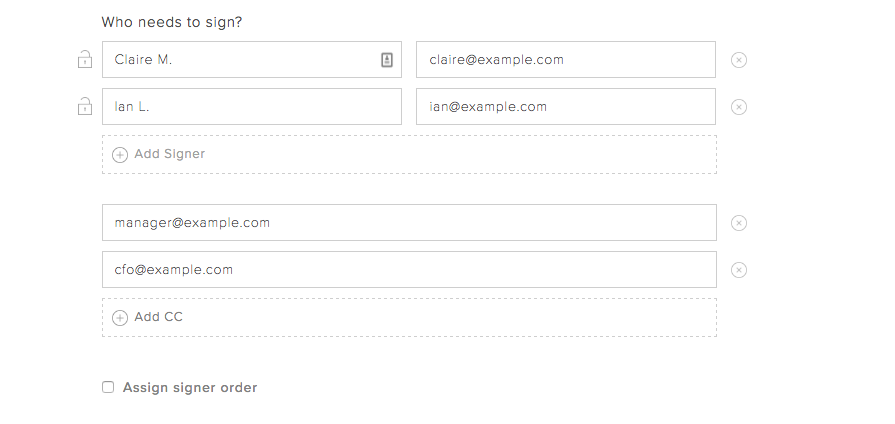
Did you know you can "cc" email addresses when sending your document for signature? It’s the perfect way to keep stakeholders in the know, even when their signature isn’t required. 

‍

You can “cc” your company’s CFO if you’re pushing through payroll paperwork, your Director of Sales when closing a deal, and much more.

‍

‍

Simply select the “Add CC” option when determining who needs to sign your document.
‍

‍

2. Make sure the right people get the document at the right time by creating a signing order

‍

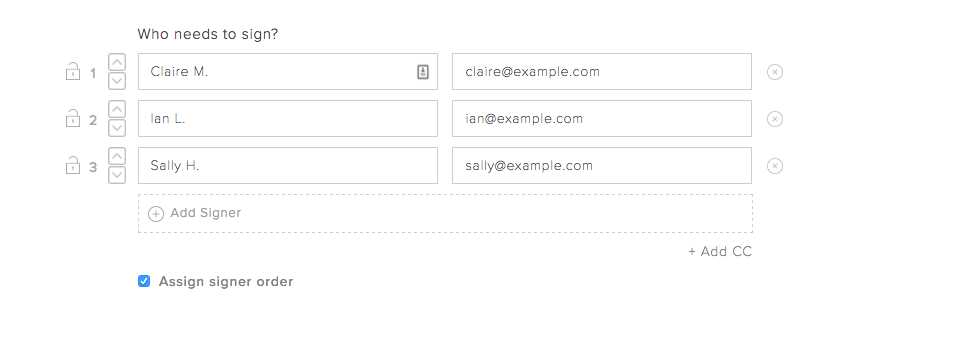
Many documents require an order of operations when it comes to getting them completed. For example, maybe you need to have something approved by HR before you can send it to your employee.That’s not a problem with Dropbox Sign’s signing order option. You’ll see it when you’re determining who needs to sign the document.
‍

‍

Use the up and down arrows to reorder names and emails. The first person on the list will receive the document first, with others getting the document in the descending order.

‍

3. Set signer permissions so your document is only accessible to the right people

‍

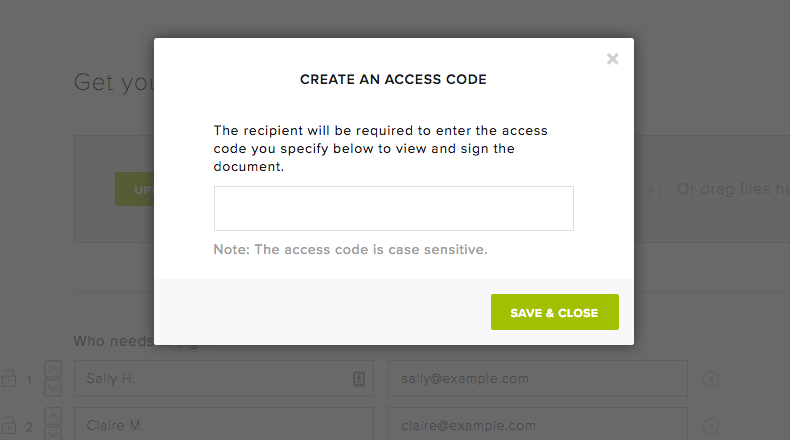
Sensitive documents require extra precautions. Dropbox Sign allows you to set a unique access code for each document. Signers or viewers won’t be able to access the document until they’ve entered the correct code. 

‍

This is an excellent option when you’re dealing confidential or sensitive team documents like internal financial information and the likes.
‍

‍

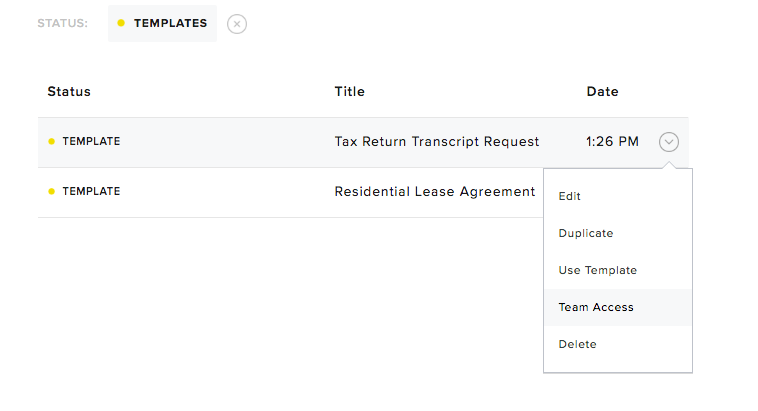
4. Share Dropbox Sign templates with team members to eliminate redundant formatting

‍

Dropbox Sign templates are an excellent way to get your team members on the same page without requiring them to double down on work. 

‍

You can easily share pre-formatted document templates with team members on your Dropbox Sign account. For example, say you’re a real estate agency and all your brokers send out the same lease paperwork when closing a deal. You can share the lease paperwork template with them so they can start selling. No redundant administrative work required! 

‍

It’s also easy to change access permissions for templates at any time. 
‍

‍

5. Standardize your team’s messaging for each document email

‍

If you’re an admin of your Dropbox Sign business account, you can customize and control the email messaging that goes out in document activity emails.

‍

This includes managing things like email tagline, “From” field, email signature, logo, and the page where signers are taken after they complete signing the document. 

‍

This is perfect for standardizing messaging and making sure that every recipient is getting the right (and consistent) information.

‍

‍

‍

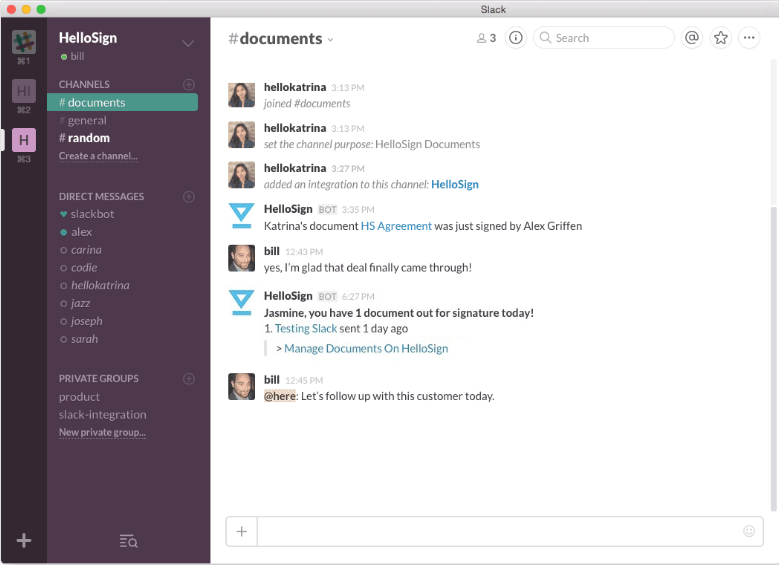
6. Celebrate team wins in real time using the Slack integration

‍

Most companies use an internal chat tool to communicate across teams. Many use Slack! If that’s you, then the Dropbox Sign for Slack integration is the perfect fit. 

‍

By connecting your Dropbox Sign and Slack accounts, you can see document activity in real time on a devoted Slack channel.You’ll see when a document has been viewed, opened – and most importantly – signed. 

‍

Click here to enable the integration!

‍

‍

Empower Your Dream Team

‍

Interested in learning more? You can try out Dropbox Sign’s team features by signing up for a free 30-day trial. If you’re already a Dropbox Sign customer, simply visit our plans page to see what upgrades might be right for you. 

Будьте в курсе всего

Готово. Проверьте входящую почту.

Thank you!
Thank you for subscribing!

Lorem ipsum

Lorem ipsum dolor sit amet, consectetur adipiscing elit. Suspendisse varius enim in eros elementum tristique. Duis cursus, mi quis viverra ornare, eros dolor interdum nulla, ut commodo diam libero vitae erat. Aenean faucibus nibh et justo cursus id rutrum lorem imperdiet. Nunc ut sem vitae risus tristique posuere.

Lorem ipsum
Значок «Стрелка вправо»
значок «закрыть»

Up next:

Человек работает на ноутбуке за столом. На экране показано, как электронная подпись добавляется к документу.
Основные сведения об электронных подписях
8
мин. на чтение

SES, AES и QES: типы электронных подписей

Person signing a document on a tablet in a living room.
Основные сведения об электронных подписях
5
мин. на чтение

How to validate a digital signature—and why it matters

Инфографика

4 способа, с помощью которых API электронной подписи способствуют росту доходов компаний, использующих модель SaaS

Продукты
Dropbox SignDropbox Sign APIDropbox FaxИнтеграция
Почему именно Dropbox Sign
Электронные подписиПодписать документыЗаполнение и подписание PDFКонтракты в электронной формеСоздание электронных подписейРедактор подписиПодписать документы Word
Поддержка
Справочный центрОтдел продажОбратитесь в службу поддержкиУправление файлами cookieНачало работы с Dropbox SignНачало работы с Dropbox Sign API
Материалы
БлогИстории наших клиентовРесурсный центрРуководство по соблюдению законовЦентр управления безопасностью
Партнеры
Стратегические партнерыПоиск партнеров
Компания
ВакансииУсловияПолитика конфиденциальности
значок Facebookзначок Youtube

Принимаемые способы оплаты

Логотип MastercardЛоготип VisaЛоготип American ExpressЛоготип Discover
Значок соответствия требованиям CPAЗначок, соответствующий требованиям закона HIPAAЗначок Sky High Enterprise ReadyЗначок, сертифицированный по стандарту ISO 9001

Электронные подписи Dropbox Sign являются юридически обязывающими в США, Европейском Союзе, Великобритании и во многих странах мира.
Более подробную информацию вы найдете в наших Условиях и Политике конфиденциальности